Overview
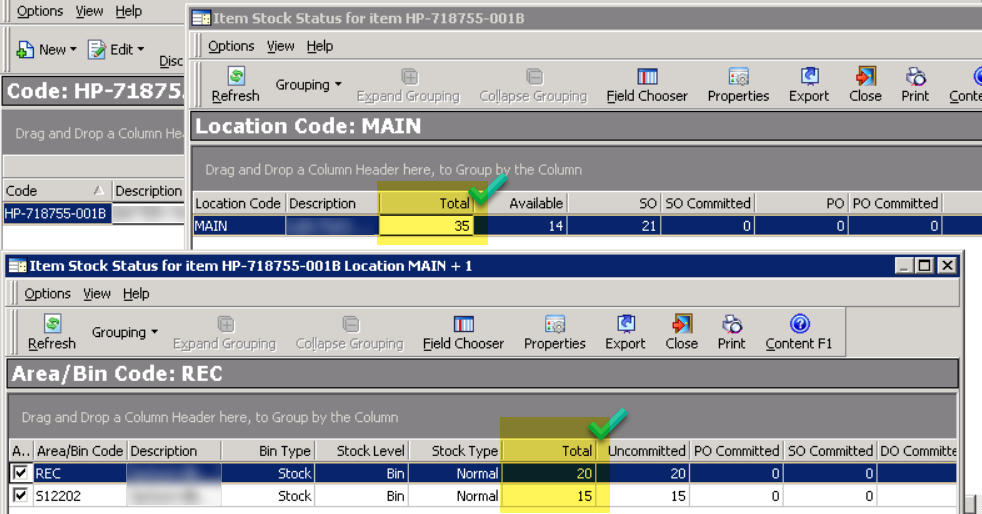
There is a mismatch between inventory stocks on different screens for inventory items.
In the example below, you can see there is a mismatch between the different locations and the main stock:

Common symptom
Item Stock Status shows Available Stock of -1 at one location and +1 at another, the Company total is 0, and the SO, PO, CO and DO columns are all 0 with no documents found. Inventory History confirms the item's true total is 0. These are residual stock-area entries that net to zero but still display at location level, and they cannot be cleared through the adjustment screens. The query in step 2 below returns the two offsetting rows; set both to 0 as described in Resolution.
Solution
Prerequisites
Access to the Everest SQL database.
Environment
Everest Standard 6.36.4 and above.
How to identify
- Use the query below to identify the correct quantity calculation for the item stock
(note theITEM_CODEparameter may vary according to the item code):
SELECT qty_stk,
       *
FROM   items
WHERE  itemno = 'ITEM_CODE'
- Use the query below to identify any stock entries where there may be a mismatch in numbers:
SELECT *
FROM   x_stk_area,
       stk_area
WHERE  stk_area.area_code = x_stk_area.area_code
       AND stk_area.type < 2
       AND stk_area.active = 'T'
       AND item_no = 'ITEM_CODE'
       AND q_stk <> 0
- Identify if there are any negative entries or old entries that might be causing a conflict in the calculation.
Resolution
Sample Results:
| X_STK_AREA_ID | AREA_CODE | ITEM_NO | Q_STK |
|---|---|---|---|
| 11111 | ACOD1 | ITEM_CODE | 5 |
| 11112 | ACOD2 | ITEM_CODE | -5 |
If the above queries produce results similar to the samples in the table above, take a full backup of the EVEREST_<Company> database and, as a minimum, back up the x_stk_area table (for example SELECT * INTO x_stk_area_bak_YYYYMMDD FROM x_stk_area;). Confirm the backup completed, then run the following query:
UPDATE x_stk_area
SET    q_stk = 0
WHERE  ( x_stk_area_id = '11111'
          OR x_stk_area_id = '11112' )
       AND item_no = 'ITEM_CODE'
The Query above will clear the Q_STK fields to zero. Please replace the X_STK_AREA_ID and ITEM_NO parameters with the values from your environment.
Testing
The correct quantities and calculation should now display correctly on all browser screens.
Priyanka Bhotika
Comments